GPU Cluster Configuration for AI Workloads
Most teams waste expensive GPUs through poor cluster design, not hardware limits.
Teams keep buying GPUs and keep getting less out of them than the invoice suggests they should. That gap between capacity and output is a configuration problem, not a hardware one: how clusters get built, networked, scheduled, and isolated decides whether those chips actually earn their keep, and most teams get the ordering of that list backwards.
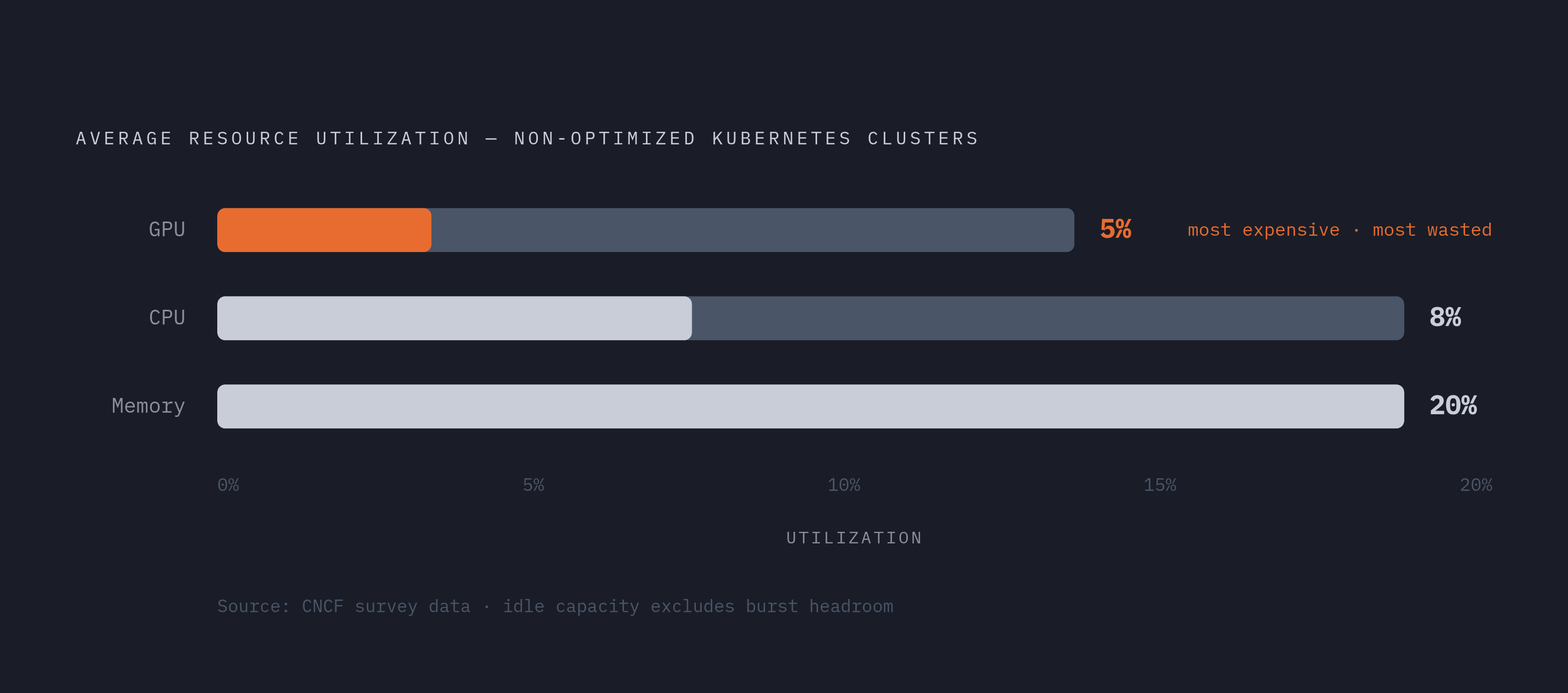
Cast AI's State of Kubernetes Optimization Report, built from tens of thousands of real clusters, puts a number on the gap that's hard to look away from: GPU utilization averaged just 5% across non-optimized Kubernetes clusters, against 8% for CPU and 20% for memory. GPUs are, by a wide margin, the most wasted resource in the stack, and they're also the most expensive one to waste. That math gets worse as prices climb rather than fall. The report also found that 74% of companies are unhappy with their job scheduling tools and regularly hit resource allocation limits, and the pattern holds: the hardware isn't the bottleneck. The systems built around the hardware are, and that's the case this piece is going to make section by section.
Most of the waste traces back to three decisions made badly, in this order, buying GPUs sized for the spec sheet instead of the model, networking treated as an afterthought instead of the actual ceiling on throughput, and scheduling systems left on default settings that nobody bothered to tune. Fix those three and the question of how to isolate workloads properly, which comes last, actually has a chance of being solved instead of papered over.
What a GPU cluster is and how its components fit together
A GPU cluster is a group of connected computers, called nodes, each carrying one or more GPUs, working together on a problem too big or too slow for a single machine to chew through alone. That's the whole idea, stripped down. The complexity lives in how those nodes talk to each other and how work gets split between them, and that's what the rest of this piece is actually about.
Why GPUs and not just more CPUs? CPUs are built to run a handful of complex instructions one after another, fast, in strict order. GPUs take the opposite bet: thousands of simple operations running at once. Deep learning is mostly matrix multiplication and vector math, work that splits cleanly across thousands of parallel threads, and that's what a GPU's architecture was built to do. Every configuration decision later in this piece traces back to that one architectural fact: this is the entire reason the industry runs on GPUs instead of general-purpose CPUs.
A cluster runs two kinds of nodes doing two different jobs. The head node schedules jobs, hands out resources, and tracks what's running where. Worker nodes are where the computation actually happens, and each one carries its own GPUs, CPUs, memory, local storage, and a network interface card to talk to the rest of the cluster. Lose that distinction and the scheduling section later in this piece stops making sense.
Clusters also split along lines that matter before any purchase order goes out. A homogeneous cluster runs identical GPUs everywhere, which keeps scheduling simple and performance predictable, since every node behaves the same way under the same job. A heterogeneous cluster mixes GPU models, buying flexibility at the cost of scheduling complexity that climbs fast, since the scheduler now has to reason about which jobs fit which hardware. Separately, there's the on-premises versus cloud question: own the hardware and manage it directly, or rent it and skip the capital outlay. None of these choices is right in the abstract. They only make sense against a specific workload, which is the whole subject of the next section.
Choosing GPUs: matching hardware to the workload before buying
Start with the workload, not the spec sheet. The right GPU is the cheapest one that a given model actually fits on and trains fast enough to be worth the hour. Chasing the newest chip because it's the newest chip is one of the more reliable ways to burn budget without moving output.
Four things decide whether a GPU fits a training job. VRAM capacity is the hard limit: run out, and the only options are smaller batches, aggressive sharding across GPUs, or offloading to slower memory, all of which cost throughput. Memory bandwidth is the softer limit, but it matters just as much in practice, because training is frequently memory-bound rather than compute-bound, and the GPU spends real clock time waiting on data instead of crunching it. Low-precision support, FP8 on Hopper and Ada Lovelace, FP4 on Blackwell, can lift throughput substantially, but only if the software stack actually supports it. Buying the chip without the matching stack wastes the capability. And once a job outgrows a single node, interconnect quality, NVLink-class links and high-speed networking, decides whether the cluster scales or just sits there waiting on itself.
Estimating VRAM needs is a two-layer problem, so do the arithmetic before signing anything. First, parameter and optimizer memory: for mixed-precision Adam training, a rough rule of thumb runs about 16 bytes per parameter. A 7-billion-parameter model needs roughly 112 GB before a single activation tensor gets counted. Second, activation memory, which grows with sequence length, batch size, and model depth, and which is usually the real culprit when a job that looked fine on paper suddenly overflows an 80 GB GPU during full fine-tuning. Hugging Face's Accelerate library includes a memory estimator tool that can serve as a sanity check before hardware gets committed to a job.
With that math in mind, here's roughly how the current lineup maps to workload and price. The NVIDIA B200 offers 180 GB of usable VRAM, 8 TB/s of bandwidth, and FP4 support at around $6.79/hr, and it earns that price for 70-billion-parameter-plus training where memory constraints can't be argued with. The H200 SXM, 141 GB and 4.8 TB/s for about $4.59/hr, is the better value for long-context training: more headroom than the H100 without the jump to Blackwell pricing. The H100 SXM, 80 GB with mature FP8 support at roughly $3.49/hr, stays the workhorse for teams already tuned to the Hopper stack. AMD's MI300X brings 192 GB and about 5.3 TB/s for around $2.39/hr, the highest per-GPU memory at that price point, provided the workload can run on ROCm instead of the more common vendor stack. The A100 SXM, 80 GB from an earlier generation at about $1.59/hr, is slower than Hopper but often wins on cost alone. The L40S, 48 GB for roughly $1.09/hr, sits as a comfortable middle for mid-scale fine-tuning. Consumer-derived cards round out the low end: the RTX 5090, 32 GB of Blackwell architecture at around $0.99/hr, handles LoRA and diffusion training well; the RTX 4090, 24 GB, runs about $0.74/hr on secure cloud or as low as $0.34/hr on community cloud, making it the cheapest real path to training throughput; and the RTX A5000, 24 GB at roughly $0.27/hr, is about as low as the entry point goes for small jobs where cost per hour is the whole decision.
That range, from under thirty cents an hour to nearly seven dollars, maps tradeoffs between workload, scale, and budget rather than ranking chips by prestige. The B200 is suited to a job the A5000 can't hold in memory, while the A5000 fits smaller workloads well. It's better for a job the A5000 can't hold in memory, and buying past what the workload actually needs is one of the more common ways clusters end up chronically underutilized while the invoice keeps climbing.
Networking: the configuration layer that determines whether multi-GPU jobs scale
Theoretical GPU throughput only means something if data can move between GPUs faster than each one finishes its slice of the computation. In distributed training, the network is usually the first ceiling a team hits, and it shows up long before any GPU runs out of room to work harder.
Three tiers of networking cover most of what's actually in production, and each trades cost against speed in a fairly predictable way. InfiniBand delivers the lowest latency and highest bandwidth of the three and remains the standard for serious distributed training. Lambda's 1-Click Clusters, for instance, run NVIDIA Quantum-2 400 Gb/s InfiniBand, enabling GPUDirect RDMA at up to 3,200 Gb/s of peer-to-peer connectivity between GPUs, according to hostingseekers.com's GPU cluster guide. RoCE v2, RDMA over Converged Ethernet, gets much of that same low-latency performance but runs over standard Ethernet fabric, bringing the cost down and working well enough for many inference clusters, provided congestion gets managed carefully, since Ethernet was never built with RDMA traffic patterns in mind. Standard Ethernet, without RDMA, is fine for loosely coupled workloads that don't need tight synchronization between nodes, but it turns into a bottleneck fast in tightly coupled training, where GPUs are constantly trading gradients back and forth.
Across these fabrics, interconnect bandwidth in a well-configured cluster varies widely depending on the fabric, topology, and how it's tuned. That range matters because it sets the ceiling on how fast nodes can share data, and a training job's real-world speed is often set by that ceiling rather than by how fast any single GPU can compute. Teams that benchmark a new cluster on single-GPU throughput and skip the multi-node test are the ones who get surprised three weeks later.
Two layers of networking get configured in very different ways, and conflating them is a common mistake. NVLink and NVSwitch handle GPU-to-GPU communication inside a single node, at bandwidth far higher than anything crossing a network cable. InfiniBand or RoCE handles communication between nodes. Both layers need to be right for a cluster to behave the way its spec sheet promises: get the intra-node fabric tuned and neglect the inter-node fabric, and the cluster still stalls the moment a job spans more than one machine. Most GPU underutilization traced back to networking is a configuration problem. It's this exact mismatch, one layer built for scale and the other left at whatever the default happened to be.
The training vs. inference split and its effect on configuration decisions
Every choice made so far assumes a workload, and by 2026 that workload has shifted. Training used to be the center of gravity for cluster planning. Inference has taken that position instead, and the industry's own language reflects it: Moor Insights & Strategy's VP and principal analyst for data center has called training "yesterday's news," with inference now the subject CIOs actually want to talk about, and NVIDIA CEO Jensen Huang described this shift as "the inflection point of inference" at GTC 2026. Among teams that have actually shipped models into production, inference now accounts for 70 to 80% of total GPU cloud spend. That flips a lot of assumptions about what a cluster should be built to optimize for.
Training and inference are genuinely different problems that happen to run on the same chips. They're genuinely different problems that happen to run on the same chips. Training runs large batches for sustained stretches, staying memory-bound and tightly coupled across nodes, optimizing for total throughput over hours or days rather than the speed of any single step. Inference asks the opposite question: latency-sensitive, driven by unpredictable request volume, often needing a much smaller VRAM footprint per request, but demanding fast cold starts and the ability to scale up or down as traffic swings.
A training cluster wants high-VRAM GPUs, the most inter-node bandwidth the budget allows, and homogeneous nodes, since predictable all-reduce performance (the step where gradients get synchronized across GPUs) depends on every node behaving identically. An inference cluster wants something close to the opposite: request throughput and low latency take priority over raw interconnect speed, fewer GPUs are often enough, and autoscaling, the ability to spin capacity up and down with demand, cuts cost and improves responsiveness more than squeezing out the last bit of peak bandwidth ever will. Configuring an inference cluster like a training cluster, or the reverse, is one of the quieter ways teams end up with hardware that's expensive and idle at the same time. The two workloads don't reward the same choices, and treating them as interchangeable is where a lot of that 5% utilization number actually comes from.
Scheduling and orchestration: turning raw GPU nodes into a shared resource teams can use
That 74% figure from earlier, companies reporting regular resource allocation limits and poor on-demand GPU access, is a scheduling failure more often than it's a hardware shortage. The GPUs usually exist somewhere in the cluster. What's missing is a system that hands them out sensibly instead of leaving allocation to whoever asks first.
Kubernetes has become the default answer, and it's the dominant orchestration layer for GPU cluster management across the industry at this point. The NVIDIA GPU Operator automates what used to be manual setup on every single node: device lifecycle management, driver installation, and exposing GPU resources to the scheduler so it actually knows what it has to work with. A common production stack for inference pairs Kubernetes orchestration with the GPU Operator for device management and KServe for model serving, adding horizontal autoscaling on top of that.
None of it runs well on defaults, and this is where most teams lose the utilization they paid for. GPU resource requests and limits need to be set explicitly for every workload. Left at default, jobs either starve for resources or grab more than they need, starving everyone else on the same node. Job priority classes matter just as much: training jobs, fine-tuning jobs, and live inference endpoints tolerate latency in completely different ways, and preemption policies, the rules for what gets bumped when resources run short, need to reflect that instead of treating every job identically. Gang scheduling solves a specific and painful failure mode in distributed training, where a job needs every GPU it asked for allocated at once, or it sits stalled indefinitely waiting on a straggler that never gets scheduled. And there's a real choice between bin-packing, which crams jobs tightly to maximize node utilization, and spreading, which limits the blast radius if a single node fails.
Neither approach is universally right, and any team that claims otherwise is probably optimizing for the wrong workload. It depends on whether the job in question can tolerate a slower run or a failed one, and that's a judgment call the scheduler's configuration has to make explicit rather than leaving to whatever the cluster happened to ship with.
Isolation and multi-tenancy: keeping workloads from interfering with each other
Shared GPU infrastructure only works if workloads can't step on each other, and that requirement has gotten sharper as AI agents and code-generation pipelines move onto the same clusters as traditional training and inference jobs. An agent running arbitrary generated code, or a pipeline executing untrusted model output, isn't the same kind of tenant as a well-behaved training job with a known resource profile. It can consume more than its share, behave unpredictably, or, in the worst case, reach into resources it was never meant to touch.
This is the same scheduling and configuration problem from the previous section, just with the stakes raised. What happens when the tenants sharing a cluster don't just have different resource needs, but different levels of trust? A cluster tuned carefully for GPU utilization, network throughput, and scheduling fairness still has to answer that question on its own terms, because none of the earlier decisions, GPU selection, interconnect design, scheduling policy, solve it automatically.
Getting utilization up without getting isolation right doesn't produce an efficient cluster. It produces an exposed one that happens to also be efficient, and treating those as the same achievement is the last, quietest way a well-configured cluster still ends up as an expensive mistake.