Running Code from GitHub Repositories Safely
Compromised maintainer accounts and mutable tags pose hidden risks in trusted repositories.
The instinct is understandable. A repository with thousands of stars, regular commits, and a polished README feels safe. I held that assumption myself for longer than I should have, until I watched a team I respected spend a weekend rotating credentials after an Action they had used for years quietly started printing AWS keys into build logs. The repository had not changed in appearance. The maintainer account had been compromised. The tag they referenced had been silently repointed. Nothing in their workflow had changed at all.
That incident is a reasonable illustration of where supply chain risk actually lives: not in obviously sketchy code from unknown sources, but in infrastructure you already depend on and have stopped scrutinizing. But what if the risk is not in what you added last week, but in what you trusted years ago and stopped looking at? GitHub now hosts over 150 million developers, with 35% of repositories public (Wiz, 2025). At that scale, the platform is not merely a place to read source code; it is delivery infrastructure for builds, deployments, and automated pipelines. The attack surface has expanded well past "someone downloads a malicious script." In 2024 alone, GitHub reported over 39 million leaked secrets, a 67% increase year over year (Pentera). The problem is not stabilizing.
The risks arrive in layers. Some materialize before you run a single line of code. Some hit during execution. Some persist quietly in logs and commit history long after the build completes. The sections that follow address each layer in sequence.
How attackers get malicious code into repositories you already trust
Mutable tags and the illusion of a stable reference
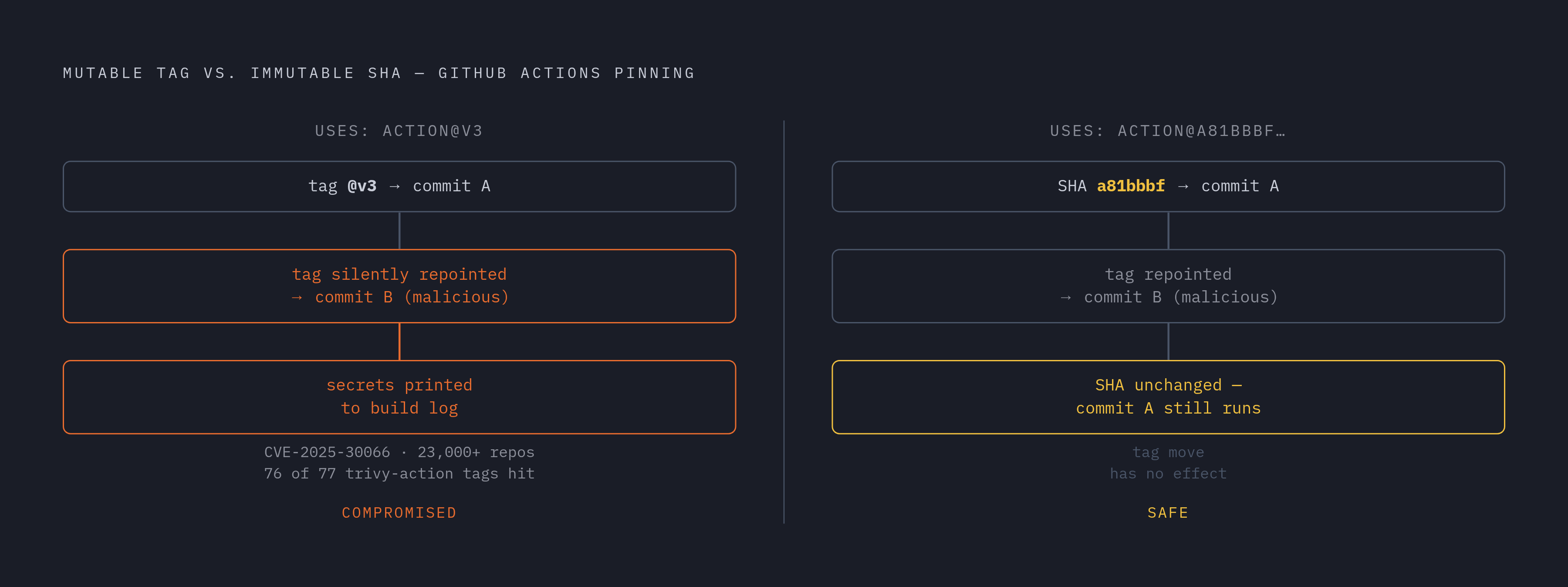
The most structurally underappreciated flaw in how most teams use GitHub Actions is that version tags are mutable. Referencing an Action at @v3 is the documented, common practice. It is also a bet that the tag will always point to the commit you originally intended. That bet lost badly in early 2025 with CVE-2025-30066.
Attackers compromised the tj-actions/changed-files repository and retroactively repointed multiple version tags to a malicious commit. That commit instructed the Action to print CI secrets, including AWS keys, GitHub personal access tokens, npm tokens, and private RSA keys, directly into build logs. The compromise affected more than 23,000 repositories before anyone detected and disclosed it. Within weeks, attackers repeated the pattern against aquasecurity/trivy-action, repointing 76 of 77 version tags to commits containing an infostealer.
The mechanism is worth sitting with. The affected repositories did not become less reputable overnight. The stars did not disappear. The commit history looked normal. The only thing that changed was where a tag pointed, and that change was invisible without active monitoring. That raises an important question: if the repository looks identical before and after a compromise, what exactly are you checking when you decide something is safe to use?
Workflow misconfigurations that hand attackers a privileged context
The pullrequesttarget trigger runs workflows with write permissions and access to repository secrets. It was designed to allow CI to function across forks, a legitimate need. The problem is that it runs in the context of the base repository even when the code being tested comes from an external pull request. OWASP categorizes the resulting class of attack as Poisoned Pipeline Execution: an attacker submits a pull request containing malicious workflow modifications, and if pullrequesttarget is combined with a step that checks out the fork's code, the malicious code runs with elevated permissions it was never meant to have.
Typosquatting, dependency confusion, and the names that look right
Dependency confusion exploits how package managers resolve version priority: a public package impersonates an internal private package name, and the manager installs the wrong one. Typosquatting is lower-tech but equally effective; Orca Security found 194 workflow files referencing @acitons/artifact rather than @actions/artifact. A 2025 study confirmed 630 real package-confusion attacks in production registries (ConfuGuard, 2025). These are not theoretical vectors.
Slopsquatting: the emerging risk from AI-generated code
A newer and less-discussed variant has emerged from AI coding assistants. Researchers generated 2.23 million code samples across 16 language models and found that 19.7% contained at least one hallucinated package name, a name the model invented, one that does not exist in any registry (CSA / USENIX Security 2025). Open-source models hallucinated at an average rate of 21.7%; commercial models averaged 5.2%. More troubling: 43% of hallucinated names reappeared consistently on every re-run of the same prompt, making them predictable. An attacker who studies common model outputs can register those names and wait for developers to run AI-generated installation instructions.
Autonomous propagation and platform-as-phishing-delivery
The Shai-Hulud worm, active between September and November 2025, spread through npm without requiring any human to make a deliberate bad decision. Wiz estimated that by late November, more than 25,000 repositories across roughly 500 GitHub users had been created or hijacked, with around 700 npm packages implicated. The worm fingerprinted execution environments to distinguish CI runners from developer workstations before harvesting credentials. This degree of operational sophistication should recalibrate how developers think about "just trying something locally."
A separate and underreported vector involves GitHub's own link structure. Attackers upload malicious files as comments on legitimate repositories, including public-sector projects. GitHub generates a trusted-looking github.com URL for the file. The file is then deleted, but the link persists and remains usable in phishing emails. Research documented by Cofense and reported by GitProtect confirmed this pattern is active.
Finally, star counts, the primary heuristic developers use to gauge trust, are gameable. Researchers identified 78 repositories with fake star campaigns that also appeared in GitHub Trending (ICSE 2026, arXiv:2412.13459). The signal is not worthless, but it is far weaker than the community treats it.
What to check before you clone or install anything
Verifying provenance, not just popularity
The cognitive shortcut that conflates popularity with trustworthiness is exactly what makes fake star campaigns effective. Before treating a repository as safe to run, check whether the organization name, maintainer profile, and commit history are internally consistent. A recently created account with a high star count and a version number suggesting years of development is worth scrutinizing. Look for signed commits (GPG or SSH) and a published security policy; their absence does not confirm malice, but their presence reflects intentional security hygiene. Note when the repository was created relative to the version it claims to be: a two-week-old repository shipping a v4.2.1 release is a structural mismatch. It is also worth considering what it would take to fake each of these signals, and which ones an attacker would find easiest to spoof.
Auditing the full dependency tree
The vast majority of vulnerabilities in open source projects are found in transitive dependencies, not direct ones (Endor Labs / Sonatype, 2024). The chain beneath the library you chose to install is where vulnerabilities typically live. Commands like npm ls, pip show, and their equivalents in other ecosystems surface the full tree before anything runs. If a suggestion came from an AI coding tool, cross-reference the package name character by character against the registry before installing it.
Lock files matter and are frequently absent or ignored. A committed package-lock.json, poetry.lock, or Pipfile.lock makes installations reproducible. An absent lock file means you cannot verify that today's install matches yesterday's.
Scanning repository history, not just current HEAD
Scanning the current state of a repository is necessary but not sufficient. A credential removed from HEAD may still exist in full in a commit from three months ago, and it may still be valid. Tools like git-secrets, truffleHog, and gitleaks can scan the full commit history. The incentive to do this is concrete: 91.6% of secrets exposed in public repositories remained valid after five days of exposure (GitGuardian, 2023). Exposure rarely triggers rapid revocation; it often triggers nothing at all until someone acts on the leaked credential.
Reading what you are about to run
This sounds obvious and is routinely skipped. Before running npm install on an unfamiliar repository, read the postinstall scripts in package.json. Check setup scripts for network calls, environment variable reads, and file system writes. For repositories you do not recognize, search the source for process.env, os.environ, curl, wget, and DNS lookups. This takes less time than recovering from a credential harvest.
Pinning dependencies and Actions to specific commits
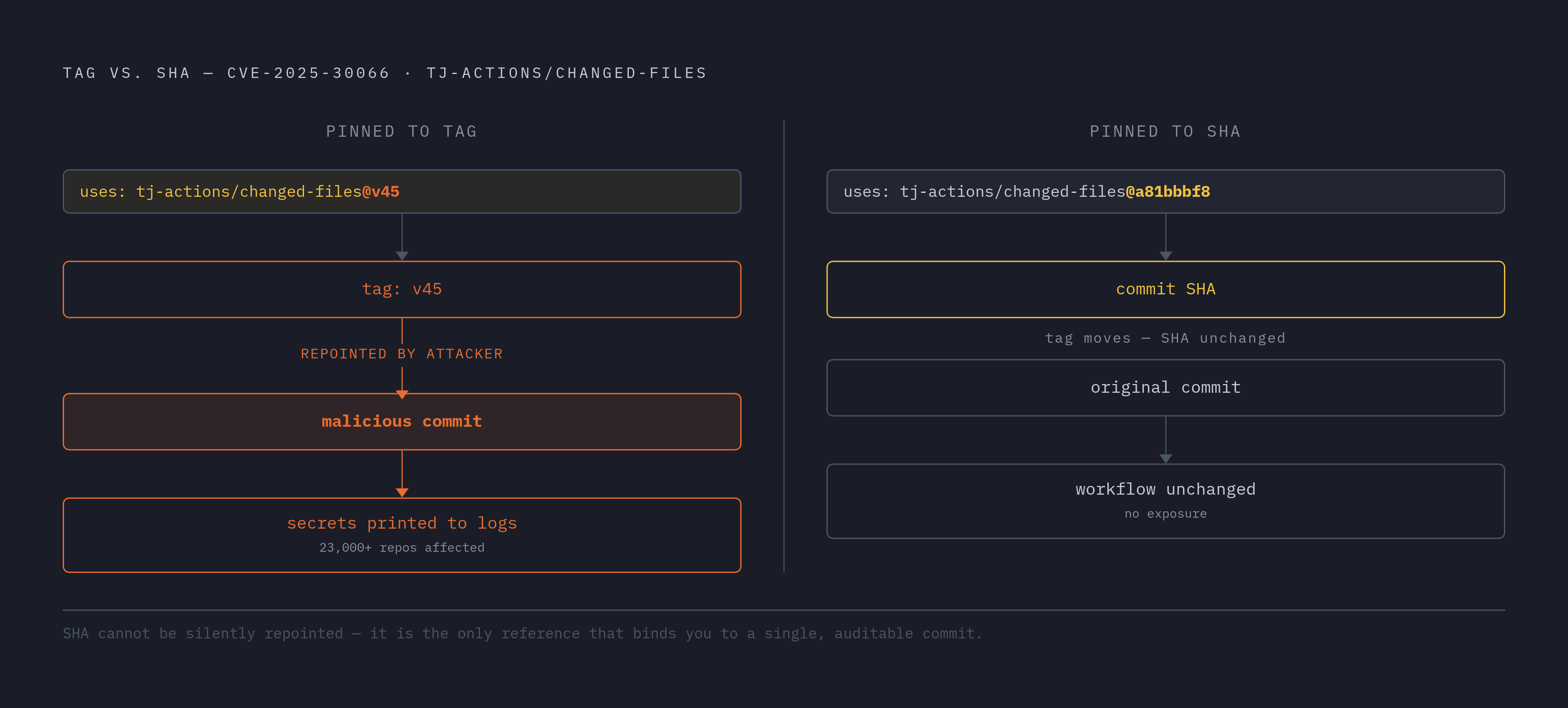
A git commit SHA is immutable. A version tag is not. That asymmetry is the entire argument for pinning, and both the tj-actions and trivy-action compromises make it concrete: any workflow pinned to the pre-compromise SHA would have been unaffected. The tag moved; the SHA did not.
For GitHub Actions, the syntax is straightforward:
uses: actions/checkout@a81bbbf8298c0fa03ea29cdc473d45769f953675The commit hash looks inelegant. It is also the only reference that cannot be silently repointed beneath you.
Pinning for package managers
In npm, the relevant discipline is using npm ci rather than npm install in CI environments. npm install can still resolve and install within semver ranges even with a lock file present; npm ci installs exactly what the lock file specifies and fails loudly if the lock file is absent or inconsistent. For Python, pip install --require-hashes combined with a pinned requirements file enforces integrity verification at install time. pip-audit can scan the resulting environment for known vulnerabilities. Where registries provide integrity hashes, verifying them, npm's integrity field and PyPI's SHA-256, closes the gap between "I fetched the right package name" and "I fetched the right package."
Tooling that makes pinning sustainable
Pinning to a SHA means security patches in a dependency do not flow in automatically. That is the point: updates become deliberate rather than ambient. The concern is that developers will fall behind on patches as a result. Dependabot addresses this directly; configured correctly, it opens pull requests when pinned SHAs are outdated, maintaining security without freezing the dependency graph. actionlint flags Actions references not pinned to a SHA at lint time. OpenSSF Scorecard scores pinned dependencies as one of its evaluated criteria, giving teams an auditable baseline.
Keeping secrets out of CI pipelines and build logs
CI runners are, by design, highly credentialed environments. They hold cloud provider keys, deploy credentials, registry tokens, and the GITHUB_TOKEN itself, all stored as environment variables accessible to every step in a workflow. The tj-actions attack exploited this directly: once the malicious commit ran, it printed those variables into build logs, which are frequently world-readable in public repositories. The attack required no sophisticated exploitation; it just needed to run.
Where secrets should and should not live
Secrets belong in GitHub Encrypted Secrets or a dedicated external vault such as HashiCorp Vault or AWS Secrets Manager. Hardcoding them in workflow YAML or committing.env files to the repository puts them at risk. Beyond storage, scoping matters: environment-level secrets are preferable to repository-level secrets because they limit which jobs can access a given credential. Secrets should be rotated on a schedule and immediately after any third-party Action update or any suspected compromise.
Restricting what a compromised step can reach
The default GITHUBTOKEN carries more permissions than most workflows require. Setting explicit permissions: blocks at both the workflow and job level, scoping down to contents: read unless write access is genuinely necessary, limits what an attacker can do if a step is compromised. Avoid passing secrets to steps that invoke third-party Actions; reserve elevated permissions for first-party or heavily audited steps. ACTIONSSTEP_DEBUG should be false in production; debug mode can echo variable values directly into logs.
The pullrequesttarget guard deserves its own discipline: never combine that trigger with a step that checks out or executes code from the pull request's branch. If cross-fork CI with secrets is genuinely required, gate it behind a separate workflow that runs only after explicit human review and approval.
Wiz's 2025 research found that 61% of organizations already expose secrets in public repositories. Scanning for leaked secrets is ongoing maintenance.
Running untrusted code in isolation
Why containers alone are an incomplete answer
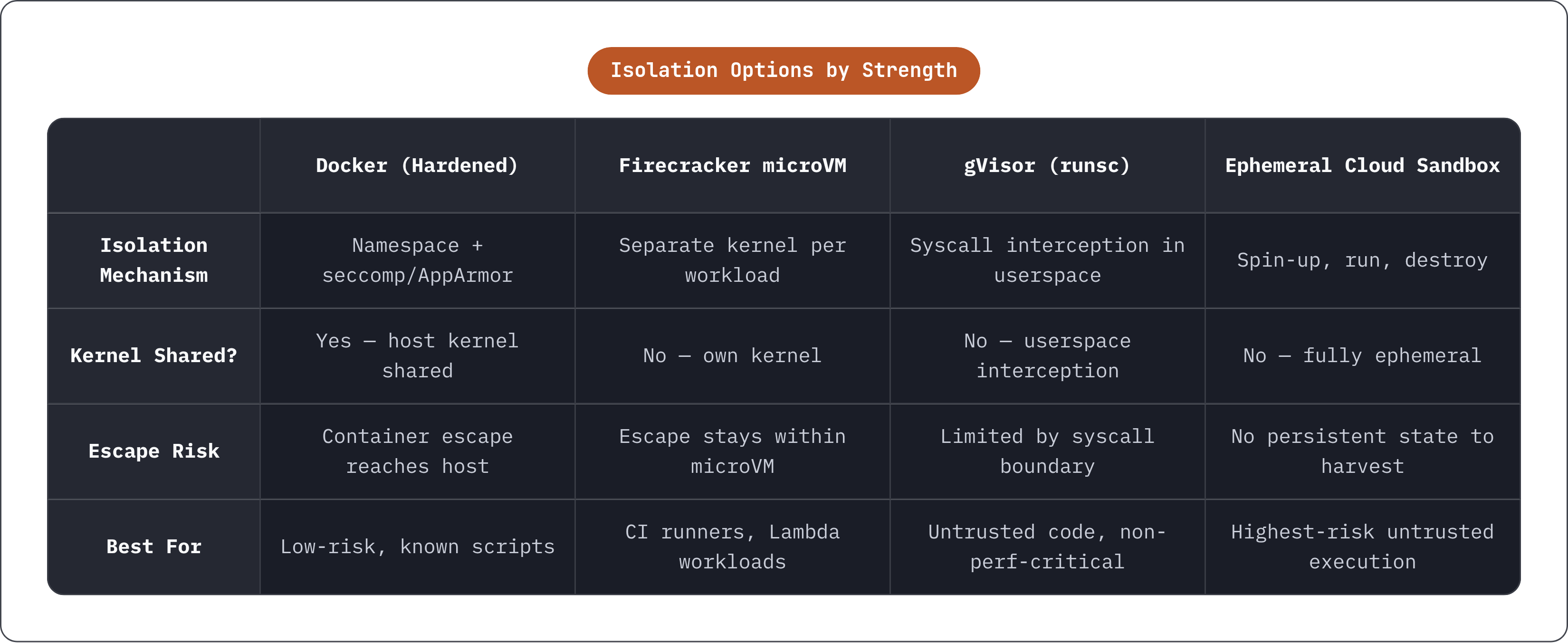
Docker containers share the host kernel. A successful container escape returns an attacker to the host environment, where the credentials, metadata services, and adjacent workloads are waiting. The Shai-Hulud worm made this explicit: it fingerprinted execution environments to distinguish CI runners from developer workstations before harvesting credentials. Isolation reduces blast radius and buys time, but stops short of a guarantee.
Isolation options in ascending order of strength
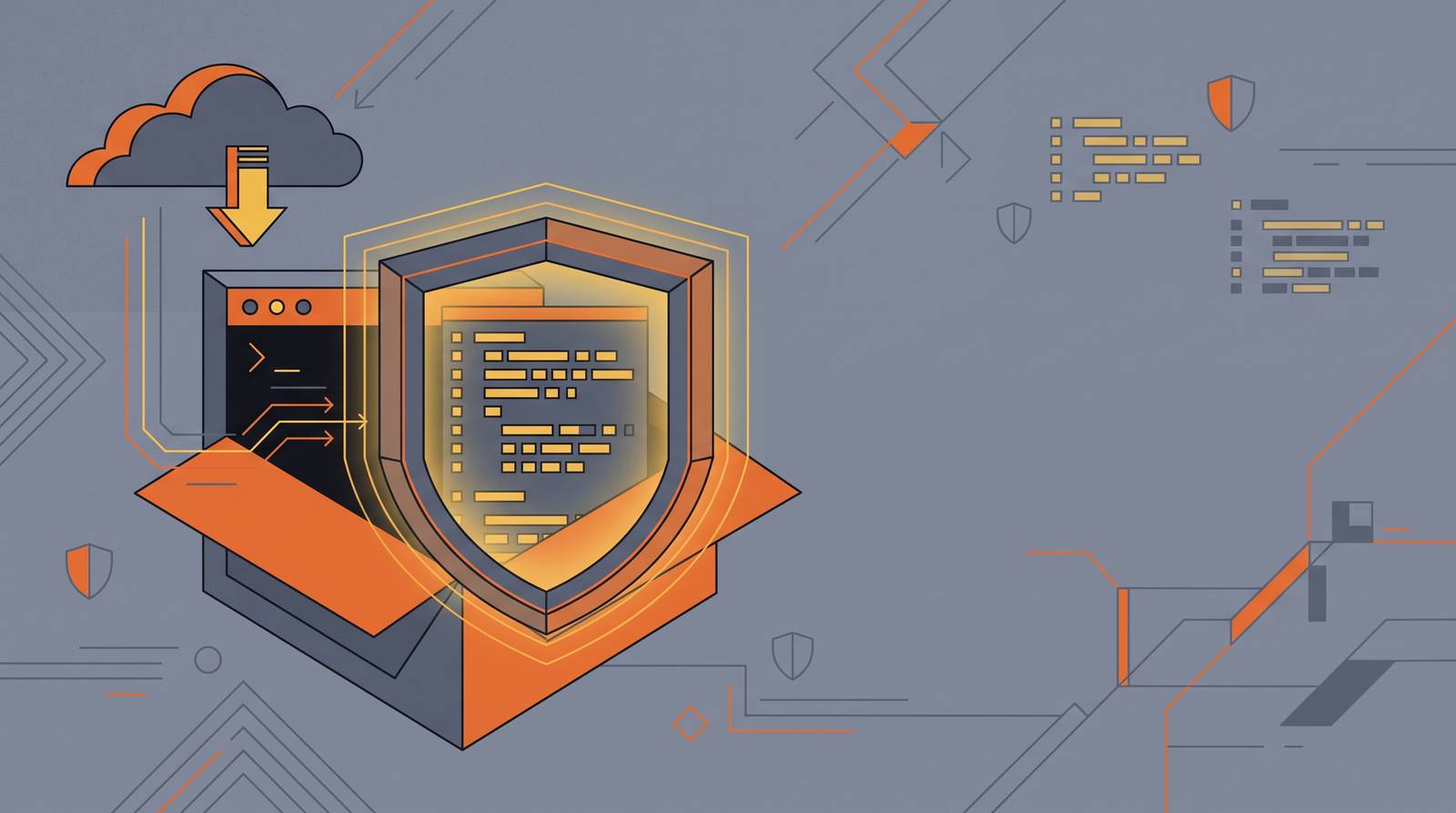
A Docker container hardened with a restricted seccomp or AppArmor profile, dropped Linux capabilities, a read-only root filesystem, and --no-new-privileges is adequate for low-risk scripts. It is the floor, not the ceiling.
Firecracker microVMs, the technology underlying AWS Lambda and GitHub-hosted runners, give each workload its own kernel. Escaping one microVM does not reach the host or an adjacent workload. gVisor (runsc) intercepts syscalls in userspace, providing meaningful isolation for untrusted code that does not require raw system performance. Ephemeral cloud-hosted sandbox environments represent the strongest practical option: spin up, run, and destroy, leaving no persistent state to harvest.
Network isolation and the metadata endpoint
Blocking outbound internet access from a sandboxed execution context removes a significant exfiltration path when the code has no legitimate reason to call external services. Shai-Hulud harvested credentials from local configuration files, environment variables, and cloud metadata services. Blocking access to 169.254.169.254, the cloud metadata endpoint used by AWS, Azure, and GCP to serve instance credentials, eliminates one of the most commonly abused exfiltration routes in cloud-hosted CI environments.
The execution environment should run as a non-root user. Source code should be mounted read-only where possible. Credential directories, ~/.ssh, ~/.aws, and their equivalents, should never be bind-mounted into an untrusted execution context under any circumstances.
Scanning and monitoring after the code is running
The detection gap
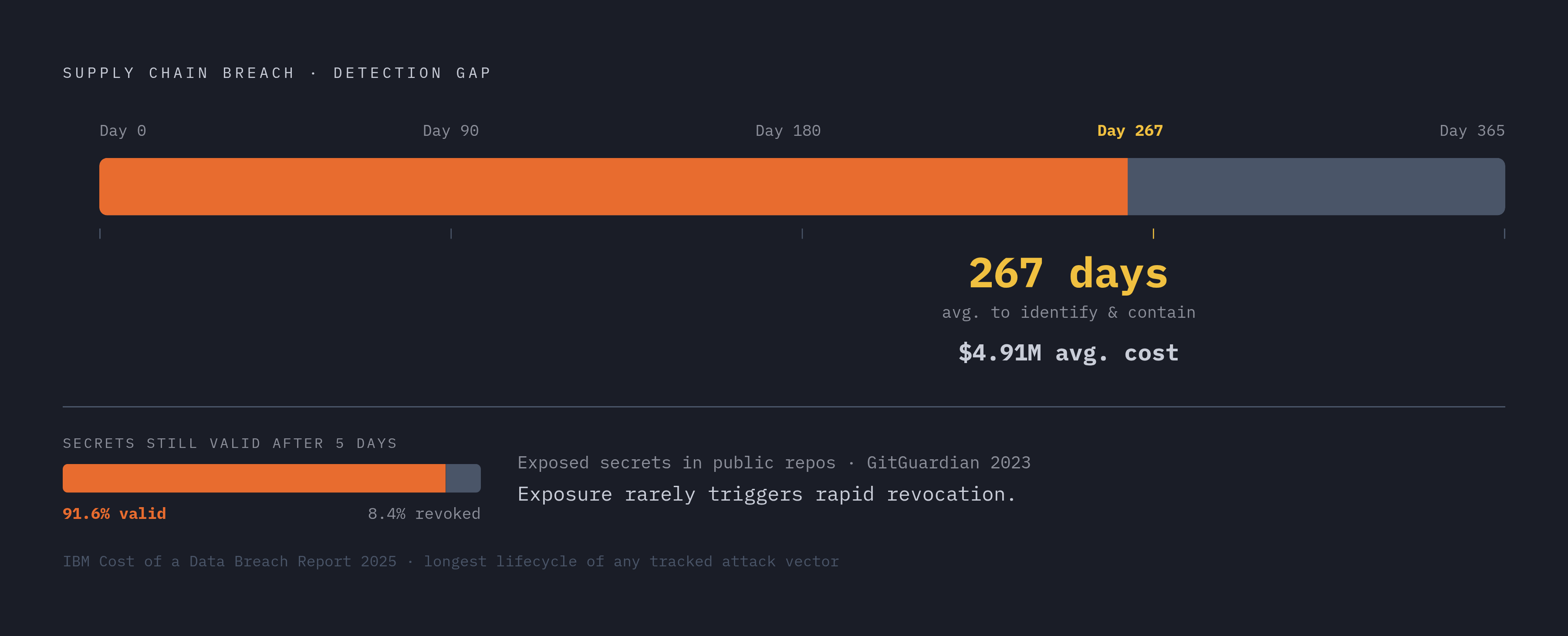
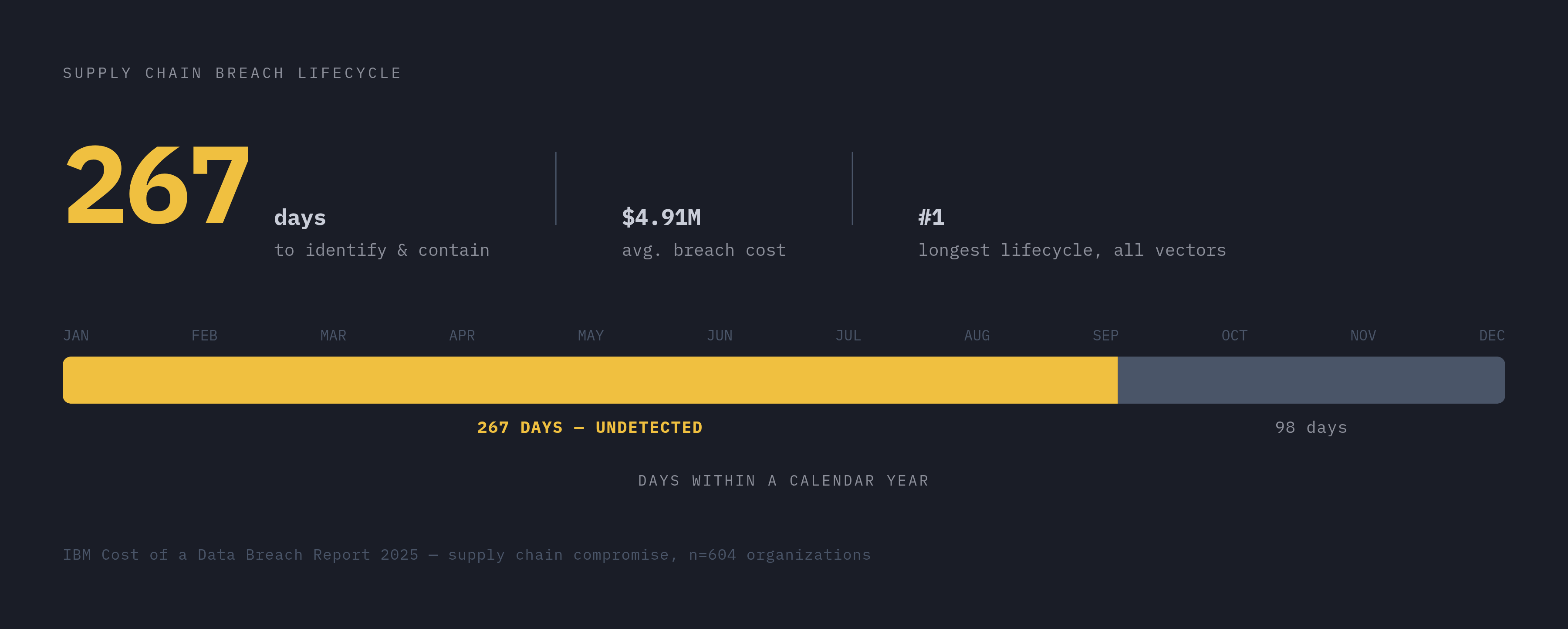
Supply chain compromises take an average of 267 days to identify and contain, the longest breach lifecycle of any attack vector tracked by IBM's 2025 Cost of a Data Breach Report, at an average cost of $4.91 million. That figure reframes what "post-deployment scanning" is actually compensating for. Controls that rely on rapid detection fall short when the baseline detection window stretches to months.
Continuous dependency scanning
GitHub Dependabot alerts on known CVEs in the dependency graph. Enabling it at the organization level, rather than repository by repository, ensures coverage does not depend on individual developer memory. CVE-based scanning is necessary but incomplete; it catches known vulnerabilities after they are catalogued, while active malicious behavior slips through. Tools like Socket.dev, Phylum, and Sonatype Lifecycle analyze what packages actually do during installation, flagging network calls, filesystem writes, and other suspicious behaviors in install scripts. Black Duck's 2025 OSSRA report found that the majority of commercial codebases contain open source vulnerabilities; scanning is a maintenance discipline, not a one-time audit.
Runtime monitoring and behavioral signals
Static scanning before execution and dependency auditing at install time both operate on what code declares it will do. Runtime monitoring observes what it actually does. Why exactly does this matter? Because anomalous outbound connections, unexpected reads of credential files, and unusual process spawning during a build step are all behavioral signals that static analysis will miss. Correlating these signals against a known baseline, what your build normally does, is how you detect compromises that arrive through trusted channels carrying unexpected payloads.
The layered approach is not paranoia; it is an acknowledgment that any single control has a failure mode. The mutable tag problem is real, and pinning addresses it. The metadata endpoint exfiltration path is real, and network isolation addresses it. The detection gap is real, and continuous monitoring addresses it, imperfectly. What I keep returning to, after years of watching supply chain incidents unfold, is that the teams who recover fastest are not the ones with the most sophisticated tooling. They are the ones who treated their dependency graph as an attack surface before something went wrong, rather than after.